A-floor
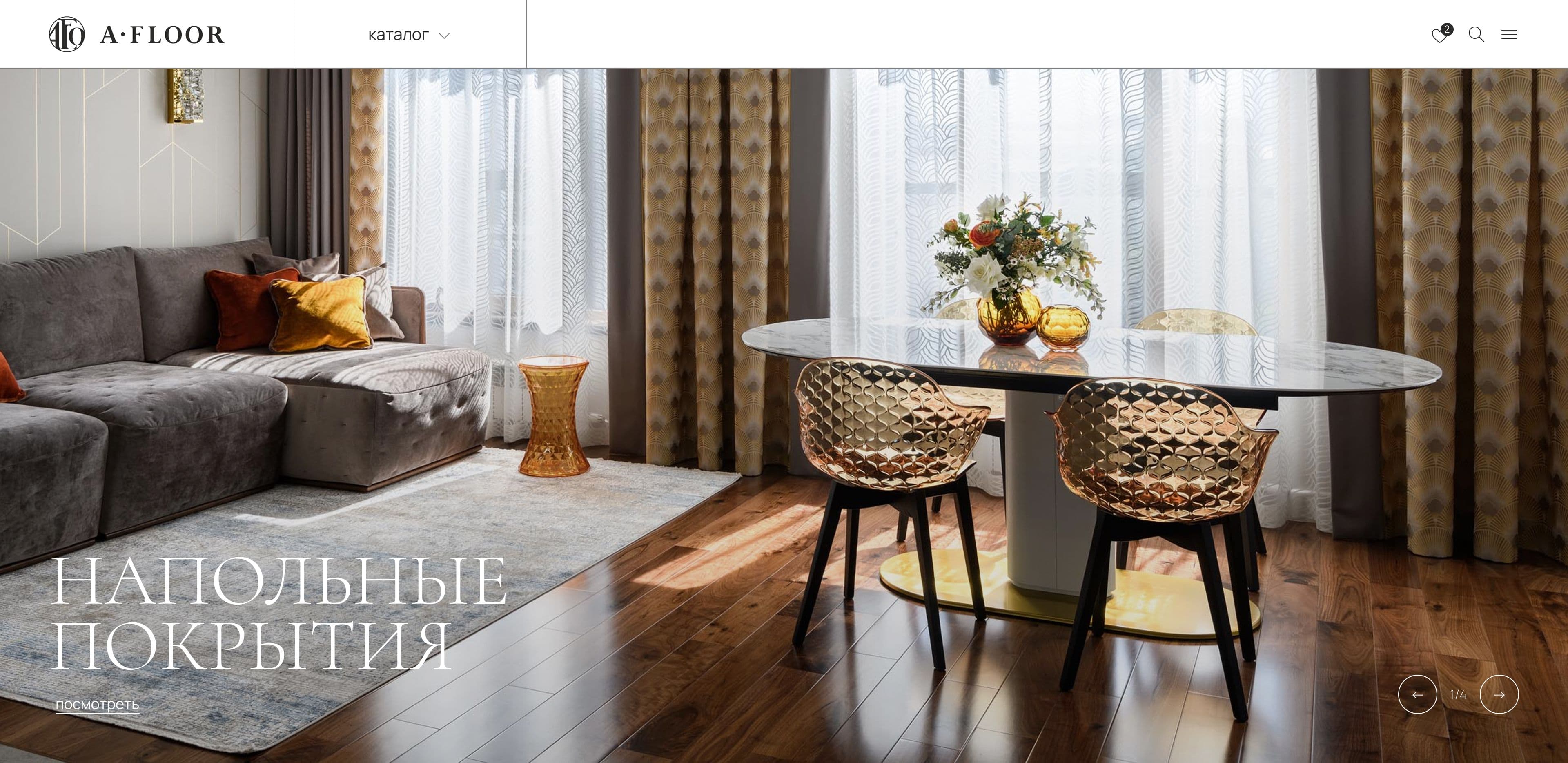
Showcase for interior design showrooms featuring thousands of products
Role
Fullstack Developer / Data Engineer
Year
2023
Stack
HTMLSCSS (BEM)JSWordpress & WoocommerceNode.js
The task
Product Goal: To create a professional material selection tool (flooring, doors, furniture, etc.) for interior designers. The aim was to hide prices—since they depend on order volume and partner status—and transform the site from a standard online store into a platform that generates product-specific inquiries for sales managers (requests linked to specific items and brands).
Engineering Challenge:
- Deeply customize WooCommerce: completely replace the product rendering layer by disabling price and cart hooks at the architectural level (rather than simply hiding them via CSS).
- Design a universal filtering system that automatically calculates available category parameters based on actual products, eliminating the need for manual configuration by the client.
- Build a robust catalog population pipeline: automate the ingestion of thousands of items from a dozen disparate sources with complex structures directly into the target WooCommerce data model.
Stages
Designing a Headless-like Catalog (Backend)
- Overriding core WooCommerce templates (
content-product.php, etc.). - Integrating "Request Price" lead buttons with hidden context passing (
data-product,data-brand) directly into Contact Form 7.
Developing a Dynamic Filter Engine
- Writing logic (
get_category_filters()) that iterates through global attributes and outputs only the characteristics that actually exist within the current category. - Implementing server-side filtering via
pre_get_postswith state serialization in the URL.
AJAX Optimization & UX
- Developing 5 native endpoints using
admin-ajaxfor live search and project/brand filtering. - Integrating
history.pushStateto preserve URLs during AJAX requests (ensuring links remain valid after reloading).
Data Engineering (Scraping & Import)
- Writing Playwright scripts to parse manufacturer websites.
- Direct data mapping (including machine translation of foreign descriptions via the DeepL API) into CSV files, where headers strictly match the WooCommerce import schema contract.
Frontend & UI Build
- Developing an independent layout layer using Gulp + Webpack (BEM, ES modules).
- Creating "seamless" responsive design without stepped media queries using
adaptiveValue()mixins for fluid interpolation of typography and spacing.
The process
Solutions
A showroom catalogue without prices or a cart
The catalogue runs on WooCommerce — chosen for its data model: products, hierarchical categories, global attributes, media galleries, and a stock admin panel a client's content manager picks up in an hour.
But I didn't build a "shop without a shop" by switching the cart off after the fact. Suppressing prices through filters like woocommerce_get_price_html is the route where the price eventually resurfaces anyway — in structured data, in a transactional email, in some third-party plugin's widget. Instead I replaced the rendering layer outright: content-product.php, single-product.php and taxonomy-product-cat.php are overridden with custom templates that simply never call the price and cart hooks. The commercial block isn't hidden — it isn't in the output at all.
Where "add to cart" would sit, there's a lead button — "Request price" — and it carries context with it: data-product and data-brand. When the popup opens, those values are written into hidden form fields, so the sales manager receives an enquiry already tied to a specific product and brand, with no need to ask "which one were you looking at?" A Yandex.Metrica goal fires on form submission, which makes catalogue conversion measurable down to the individual product card.
Filters computed per category
This is the core engineering of the project. Every product group has its own set of characteristics: flooring has wood species, grading, bevel, wear class, joint type, attached underlay; doors have something else entirely. Maintaining that as a per-category settings list would have condemned the client to manual upkeep every time the range expanded.
So the filter set is derived from the data. get_category_filters() walks every global WooCommerce attribute and, for each value, checks whether at least one product in the current category actually carries it. Only the characteristics — and only the values — genuinely present in that category survive; attributes with no overlap aren't rendered at all.
The practical effect: under "Laminate" a designer sees wear class and joint type, under "Doors" a different set, and it maintains itself. The client creates a new attribute in the admin, assigns it to products, and the filter appears on the relevant categories without a single line of code.
The first three groups are expanded by default and the rest collapse into an accordion, so a long list doesn't eat the viewport. The sidebar sticks on scroll; on mobile it becomes a slide-out panel with the page behind it locked.
Filter state is serialised into the URL query string and applied server-side via pre_get_posts. The handler is written generically: any GET parameter matching an existing attribute taxonomy becomes a tax_query condition. Nothing is hardcoded against specific characteristics. A side benefit of server-side filtering: a filtered selection lives at its own URL — it can be sent to a client over a messenger or saved as a bookmark.
The AJAX layer
Five endpoints, all on admin-ajax, all returning ready-made markup fragments rendered PHP-side — so the product card is defined in one place and looks identical wherever it appears.
| What | Where it runs |
|---|---|
| Live product search | dropdown panel in the header, 1s debounce |
| Project filter by tag | the completed-projects catalogue |
| Brand filter by product group | home page and brand catalogue |
| Featured product selection | home page |
Search returns a thumbnail, name, category and brand for each hit — a designer recognises the product straight from the results, without opening the page.
The project filter additionally syncs state to the address bar via history.pushState and restores the selected tag on load. A link to "projects in Novosibirsk" stays a link — shareable, surviving a reload and the back button.
Populating the catalogue: scraping → CSV → import
Several thousand items can't be entered by hand, and without densely populated attributes the whole computed-filter design is pointless — there'd be nothing to filter on. So the catalogue was populated through an automated pipeline: a separate Playwright collection script per manufacturer.
The key decision here was not to "collect first, map to fields later" but to write straight into the target data model. The collector emits CSV whose headers already constitute the WooCommerce import schema:
post_title; images; attribute:pa_collection; attribute:pa_chamfer;
attribute:pa_coating; attribute:pa_texture_color; tax:product_cat
There's no intermediate mapping: the file goes into the import plugin, and the characteristics immediately become the very attributes the category page assembles its filters from. The collector's schema and the catalogue's schema are one contract, not two things to keep in sync by hand.
Every script follows the same shape: traverse catalogue pagination, deduplicate links, parse product pages one by one, extract characteristics into a dictionary, then normalise to a shared field set. Products without a title are skipped; an error on an individual page is logged and doesn't bring down the whole run — across thousands of pages that matters. For sites requiring authentication the session is reused from saved state; foreign-language manufacturer descriptions are run through DeepL with formatting preserved.
Brands as a section in their own right
For a designer a brand is an entry point every bit as important as a category: the search often starts with "I need that specific Austrian manufacturer." So a brand is implemented as a global WooCommerce attribute with its own permalink rule and dedicated page template: /brand/{slug}. Description, country, year founded, logo (in two states — default and hover) and background all live in ACF fields on the term itself.
The brand catalogue is an A–Z index covering both Latin and Cyrillic, with correct grouping of multibyte initials, plus live search by name and a filter by product group. Three ways to find a brand for three different situations: I know the name, I know the letter, I only know I need doors.
Favourites as a moodboard
A designer assembles a set of materials for a project — that's closer to a moodboard than to a shopping cart. Storage is delegated to YITH Wishlist (server-side, so it survives a change of device for logged-in users), but the favourites page doesn't use the plugin's shortcode: it reads the items directly and renders them with the same card as the catalogue — "Request price" button included.
That keeps favourites an entry point into a conversation rather than a dead end shaped like a pre-cart. The header counter updates without a reload, driven by add and remove events.
Frontend and build
The frontend was built as a separate project on Gulp + Webpack: 13 pages assembled from around 34 reusable partials, SCSS following BEM.
JavaScript is native ES modules, with no jQuery in the frontend layer. Six distinct Swiper configurations, including thumbnails linked to the main gallery on the product page. The project gallery is lightGallery over a justified layout: interior photographs of varying proportions line up into rows of equal height without cropping the frame — which, on a project about the visual, is the whole point.
The build automates the routine: image conversion to WebP wrapped in <picture>, SVG sprites, font conversion to woff2, media-query merging, autoprefixing, and timestamp-based cache busting.
Site structure
- Catalogue — nested categories (flooring → laminate, LVT, parquet, carpeting; furniture → sofas, tables, chairs, shelving, display cabinets), per-category filters, product page with gallery, specifications and related items
- Brands — A–Z index, brand page with description and its products
- Projects — a catalogue of completed interiors filterable by tag; project page: brief, year, location, designer, photographer, materials used, gallery
- Resources — blog, news, events, special offers; each section has its own post template
- Favourites, About, Contacts with a showroom map
Stack
Backend — WordPress, WooCommerce (catalogue model, attributes, category hierarchy), ACF (fields for projects, brands, products), YITH Wishlist, Contact Form 7 with programmatic injection of product context
Frontend — SCSS / BEM, native ES modules, Swiper, lightGallery, noUiSlider, Tippy.js, Google Maps JS API
Catalogue population — Node.js, Playwright, csv-writer, DeepL API; imported into WooCommerce via WebToffee Import Export
Build — Gulp 4, Webpack 5, HTML assembled from partials, WebP pipeline, SVG sprites, font conversion, cache busting
Analytics — Yandex.Metrica with goals on form submission, cookie consent banner
The results
Playwright scripts for parsing
catalog items
hardcoded filters
custom AJAX endpoints